Latest Updates
Showing posts with label Blogger. Show all posts

How to put add read more button for blogspot

Without read more facility your blog homepage will be within only two or few posts.when readers reading posts in your blog they can't find other posts easily.so after you add read more button for your blog you can see there are more posts on your blog homepage.the one method is use the tag <span class ="full post"></span> every time you write a blog post.
But it is not need now.there is a easy way to add read more button to your blog.
Follow the instruction.
  1. Go to blogger dash board  here , and go to template
  2. before change anything on template firstly backup the template using Backup/Restore Button
  3. Click on edit template >> expand widget template
  4. Press Ctrl+F and paste the code in the search box 

    5. copy and paste the following code above that


 6. Place this code between ]]></b:skin>  and  </head>


7.If you can't find  ]]></b:skin> ,find  " <data:post.body/> " or " <p><data:post.body/></p> " 
 And paste that below code below on of   that code


8.Save the template.
9.To add read more while your post writing after the introduction paragraph or after the paragraph you want you want  to show on the homepage click on the "break" icon located above  the content box.
See below picture

How to put code box on blogspot

I saw in many technical blogs that they put java/script code  directly on the post.sometimes readers can't separate the code from the post when they try to copy that code.so the solution is CODE BOX.there are many types of code box but I'm telling to you how put the simple code box in your blog post.

copy the  this code

<textarea name="textarea" cols="40" rows="4" wrap="VIRTUAL">
YOUR CODE 
</textarea>


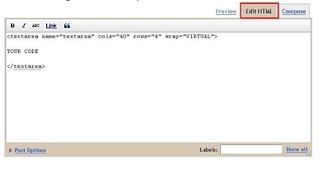
then in your new post click on the HTML tab and paste the code
see the below picture If you have a trouble 
now you can see the result like this


replace YOUR CODE  from the code 
you can make some changes
 replace the 40 number of column you want
replace  the 4  number o rows you want

Use permalinks for better search engine optimization

                             Hi everyone,back again with another search engine optimization guide article.We started this guide for blog beginners who looking for search engine optimization.First of all I would like to provide the previous post of our guide.If you are new to PENTIUM PRO it will help to you understand correctly what we told.


SEO GUIDE FOR BEGINNERS-1
USE RIGHT KEYWORDS | SEO GUIDE FOR BEGINNERS -2
SEO GUIDE FOR BEGINNERS 3
CUSTOMIZE POST TITLE SEO FRIENDLY | SEO GUIDE FOR BEGINNERS 

                 Today we are going talk about the "Permalink".Day by day we are looking for successful SEO tips which are important for us and you.So every thing were tested by us and have got best result form them.I would like to say that I'm also looking for search engine optimization(SEO) and finding the successful tips and tricks to attract more visitors through search engines.In that case permalinks is very important thing that help you increase your site traffics.we also use permalinks as a tactic in search engine optimization (SEO).I will explain you how permalinks help to increase our site traffic step by step.


What is " PERMALINKS " and How is it works?
                                     Your every article have a link and through this link you can visit your blog post.I told you in early posts that the blog post link is a influential in SEO.Using permalinks is a very easy thing that you can do before publish your post.In your blog dashboard see the right side then you can find the method for using permalinks.see below picture.
                            After you finish writing your blog post firstly you must add labels to that.labels help stay visitors more times in your blog.SO don't forget to add labels for your post.After adding labels then we move to permalinks.when you click on the "Permalinks" you can see it indicate your default blogpost address.like below picture of this post.
                            So then we are going to make changes on it that useful for being found your post on search engine.click on Custom Permalink .then think about the main keyword of your article.In my article I want to give it for visitors as seo guide for beginners.so I add it on the box.It looks like below snapshot after making changes.
                    Keep it mind when you are changing the permalink type your keyword without spaces as like I did. seoguideforbeginners.Then it will help you being found your article in search engines.

make your blog Adsense friendly


Having an inappropriate content in your blog or website is against the AdSense program policies. Inappropriate content can be any images, forum posts, comments, links etc. It may also include sexually explicit forum posts or spam bot comments with links to adult sites.

Top tips to make your blog Adsense-friendly are mainly categorized under two heads namely ‘Prevention‘ and ‘Monitoring‘.

Prevention


Publish clear content guidelines and policies that your users will have to accept and adhere to in order to sign up and use your site’s services.
If you own a photo or video sharing site where users are permitted to upload adult or other non-compliant content, clearly structure your content to avoid placing your ad code in sections/categories containing this type of content. The same idea could also be easily applied to online stores with adult sections or to classifieds sites which offer adult dating classifieds.

Ask users to tag their inappropriate content (e.g. sexually suggestive pictures or videos) as being non family-safe. This can help you perform human evaluations of potentially inappropriate content for AdSense ads. You can also try installing keyword filters for content related to adult topics, violence, or drugs, for instance. While we’re unable to provide you with details about setting up these filters for your site, we recommend searching for terms such as “keyword filtering” or “content filtering” on Google.com.
Implement spambot protection for your comment forms, forums, and guest books. If you need more information on this topic, try a Google search for “spambot protection”.

Monitoring

Set up ways for your community to monitor itself. For example, try adding a “Report inappropriate content” link to your pages, to allow users to flag content for you to review.
Proactively review pages, videos, photos, etc. with high pageviews on a regular basis.
Spot-check content based on keywords, content search, or related user accounts. For example, try entering keywords related to inappropriate content in your own search engine and checking the results. Alternatively, you can search on Google.com using the following parameter, replacing ‘example.com’ with your own site’s URL and ‘keyword’ with a specific word or phrase: “site:example.com keyword”.
Create editorial policies and exercise moderator control in your comments, forums, and guestbook sections.

Source

Be Aware When You Install Third Party Code On Your Blog

Be Aware When You Install Third Party Code On Your Blog

We've been seeing a few problem reports, in Blogger Help Forum: Something Is Broken, from blog owners who are not aware of the risks from installing third party code, on their blog. Some blog owners are not even aware that the code being installed is not supplied by Blogger - and is not subject to the same coding standards as code supplied by Blogger.

Third party accessories and code - from simple JavaScript that installs in the blog template, to attractive XML gadgets installed using the "Add a Gadget" wizard - has always been a challenge, to Blogger blogs. Knowing when you are installing code provided by someone other than Blogger / Google, and taking appropriate precautions, is your responsibility.

Blogger provides a large library of XML coded accessories, installed using the Layout "Add a Gadget" wizard. As we have learned in the past, however, the "Add a Gadget" accessory library is also used for distribution of non Blogger supplied gadgets.

Gadgets supplied by Blogger are available using "Add a Gadget", and are labeled "By Blogger". Google does have other accessory libraries - the late "iGoogle" library is one well known one. That aside, most Blogger blogs - and all non Google websites, which are used for distribution of Blogger accessories and gadgets - are non Blogger products.


Be aware of what you are about to install, on your blog.

  • A gadget provided using "Add a Gadget", and labeled "By Blogger" is a Blogger provided gadget.
  • A gadget provided using "Add a Gadget", but not labeled "By Blogger", is not a Blogger provided gadget.
  • A gadget provided using a Blogger blog, which is not published by Blogger, is not a Blogger provided gadget.
  • A gadget provided using a non Google website is not a Blogger provided gadget.


These are examples of Blogger supplied gadgets. Anything different is not a Blogger supplied gadget.

If you install non Blogger code in the template, and later see
Your blog has been deleted because of MALICIOUS JAVASCRIPT
this is a risk which you take.

Do not install non Blogger code on your blog, without knowing the risks.

Source_hhttp://blogging.nitecruzr.net

10 tips to increase traffic in your blog

1. Write Well and Write Often
                     Frequently updating your blog with useful content is the first step to building your blog's audience. The content you write is what will keep readers coming back for more. Make sure you have something meaningful to say to them and say it often to maintain their interest and keep them loyal.

Furthermore, post frequently to increase the number of chances you have for your blog's content to be noticed by search engines such as Google or Technorati.

2. Submit Your Blog to Search Engines
                      Get on the radar screen for the popular search engines such as Google and Yahoo! by submitting your blog's URL to them. Most search engines provide a 'Submit' link (or something similar) to notify the search engine of your new blog, so those search engines will crawl it and include your pages in their results.


                It's important to understand that simply submitting your blog to search engines doesn't mean your pages will appear at the top of a Google search results screen, but at least your blog will be included and will have the chance of being picked up by a search engine.

3. Use and Update Your Blogroll
                           By adding links to sites you like in your blogroll, the owners of those blogs will find your blog and will be likely to add a reciprocal link in their blogrolls. It's an easy way to get the link to your blog in front of many readers on other blogs. The hope is that some of those readers will click on the link to your blog on the other blogs' blogrolls and find your content interesting and enjoyable turning them into loyal readers.

4. Harness the Power of Comments
                            Commenting is a simple and essential tool to increase your blog's traffic. First, respond to comments left on your blog to show your readers that you value their opinions and draw them into a two-way conversation. This will increase reader loyalty.

                    Second, leave comments on other blogs to drive new traffic. Make sure you leave your blog's URL in your comment, so you create a link back to your own blog. Many people will read the comments left on a blog post. If they read a particularly interesting comment, they are highly likely to click on the link to visit the commentor's website. It's important to make sure you leave meaningful comments that are likely to invite people to click on your link to read more.

5. Syndicate Your Blog's Content with an RSS Feed
                    etting up an RSS feed button on your blog makes it easy for your loyal readers to not just read your blog but also know when you publish new content.

6. Use Links and Trackbacks
Links are one of the most powerful parts of your blog. Not only are links noticed by search engines, but they also act as a tap on the shoulder to other bloggers who can easily identify who is linking to their sites. Linking helps to get you noticed by other bloggers who are likely to investigate the sites that are linking to them. This may lead them to become new readers of your blog or to add links to your blog from theirs.

                              You can take links to other blogs a step further by leaving a trackback on the other blog to let them know you've linked to them. Blogs that allow trackbacks will include a link back to your blog in the comments section of the post that you originally linked to. People do click on trackback links!

7. Tag Your Posts
               It takes a few extra seconds to add tags to each of your blog posts, but it's worth the time in terms of the additional traffic tags can drive to your blog. Tags (like links) are easily noticed by search engines. They're also key to helping readers find your blog when they perform searches on popular blog search engines such as Technorati.

8. Submit Your Posts to Social Bookmarking Sites
              Taking the time to submit your best posts to social bookmarking sites such as Digg, StumbleUpon, Reddit and more can be a simple way to quickly boost traffic to your blog.
.
9. Remember Search Engine Optimization
              When you write your blog posts and pages, remember to optimize your pages for search engines to find them. Include relevant keywords and links but don't overload your posts with too many relevant keywords or completely irrelevant keywords. Doing so can be considered spamming and could have negative results such as your blog being removed from Google's search entirely.

10. Don't Forget Images
                     Images don't just make your blog look pretty, they also help people find you in search engine listings. People often use the image search options offered by Google, Yahoo! and other search engines, and naming your images with search engine optimization in mind can easily boost your traffic.

Source_About.com

how to customize blog tag cloud

                    If your blog is success in heavy traffic there is a secret behind it.it is called as "tags".All your posts in blog are grouped & arranged by their tags to find them easily for visitors.And the other thing ,visitors will stay on your blog if posts arranged well by their tags.Since, the default Labels Widget of Blogger Platform does not have a clean and elegant look. Therefore, we have to customize it with the help of CSS.

See here the difference between the old tag cloud and the customized   tag cloud.


How to customize the Tag cloud 

   follow the below steps carefully.
  • Go to Blogger Dashboard >>Add a gadget >> Tag
  • Now customize the gadget settings as below screen shot.

                 select display settings as "cloud"
       then uncheck the Show number of posts per label.


             then get ready to customize the tag cloud which you added.
  • Go to blogger dashboard >> Template 
  • Don't forget to backup your template before make any changes on html.
  • Then Edit HTML >> search for the ]]></b:skin> (press ctrl+F and paste that code in to the search box )
copy & paste below code above ]]></b:skin> 


To Change the Hover Color Replace #ff0; with any color according to the desire needs.
To increase/decrease the font size replace 14px according to your needs.

Now save the template.

online advertising on website

online advertising on website

Where To Put It On The Page

This is a good point of debate. The most popular placement is the top center, but I don't know that that's always the best place. You see, these things take time to load up, especially if they are animations.
     If the banner does not load quickly and the page has set aside all images with height and width commands, then all of the page's text comes in and a hole is left where your banner should be. Users will simply start scrolling downward without ever seeing the image. It will come in and if you're using a program to count the number of times the banner displays, a count will be made. But did the user really see the banner?
I offer these suggestions to get your banner seen as often as possible:


  • Go as small on the bytes as possible

     The lower the bytes, the faster the load.

  • Make the first image in the animation an eye grabber

     It might make then stay for the rest of it.

  • Try a placement lower on the page

     See the CNN Home Page for a lesson in this. I always wait to see the top story. By the time I read the headline and start scrolling, the smaller advertisements half-way down the page are up and ready for my viewing. Yes, there are banners across the top, but I wonder if the banners down the pages aren't the better buys. It's a great method of placement, but you have to have a page design that will stop people for a moment, then get them to scroll.

  • Try to get on more than one page on a site

     If you are only on the home page, and someone misses your banner, you're done. But if you are on three or four pages, then your banner is cached from its having been loaded on the home page. Now, when the user goes to the next page with your banner on it, you pop right up.

  • Be sure to use the ALT command

     If you don't know about the ALT command in images, read about it here. This command allows for the little yellow box that pops up when you roll your mouse over an image. But, in addition to the rollover, the ALT command places text in the boxes set aside by the height and width commands. So even if your image doesn't pop up, there will at least be some text there to catch some attention.

  • Be sure to use the height and width commands

     So there will be a box for the ALT text to pop up in.

  • Run your banner off of the server that is displaying the page

     This isn't always possible, but when you can, do it. It will lessen the number of possible problems and speed the display.

Keeping Track of Visitors

How do you do it? Good question. If you have your banners on five different sites, how do you know which sites are being good to you and which are not? The method is so simple and so good, I shook my head in amazement that I hadn't thought of it earlier.
Let's say you are advertising on three sites, A, B, and C. You have four home pages that are exactly the same. The first page is the original home page. This is the page you see if you come to the site through a Yahoo! search or by being given the address.
     The next three home pages should be labelled in accordance with the three pages you are advertising on. The advertising banners you are running on site A should all be pointed to a home page called indexa.html. All the advertising on site B should be pointed at a home page called indexb.html, and finally site C should have all of its advertising banners pointed to indexc.html. Put a counter on each page. Now you can keep a fairly straight record of which advertising is doing best for your site. Plus, you can see if the advertising is working at all. If the original index page is bringing in the most traffic, then you know the sites running your advertising ain't working.
     You will need to rely on the site you are buying advertising space on to provide you with simple information such as number of displays versus number of clicks. HTML Goodies has two seperate programs running to keep track of that data, but smaller sites might not be as well equipped.

Activating the Banner

Okay, you have a site that offered a price you can afford, or wants to trade with you. The site asks for the code to run your banner on their site. What do you send them?
     I would first suggest you set it up so that you can run your banner off of their site. If your banner is being run on their pages, from your server, there are a ton of things that can go wrong. But if you are running your banner on their pages, off of their server, there are still things that can go wrong, just not as many.
Don't get fancy with the code. Don't try to run an applet or any fancy image flip deals. Simple is easiest. Here's the basic code. I feel this is sufficient.


But a lot of people like the onMouseOver look where text pops up in the status bar. I think it's a bit much and might cause problems, but here it is before you ask.


Source_ HTMLGODDIES

set up a free Google groups web forum in blogger

set up a free Google groups  web forum in blogger

                                          An interesting way of diverting the attention of your readers is to start a discussion over a topic that is trending in the blogosphere. Those who have successful blogs would agree here that reader’s interaction is extremely significant not only for the website’s reputation, but also for generating affiliate sales.  We do have Commenting system that allows readers to interact, but they don’t have the freedom to start a whole new conversation. For that reason, we have Web Forums that allow a user to start a discussion over any topic that he likes. Those who are looking to add a Forum to their Blogger enabled website then today in this article, we will learn how to create a Google Groups Forum in Blogger.


Our Main Goal:

Installing a Forum in a BlogSpot blog appears to be an uphill task. Since, everything is under Google’s control. Therefore, it gets extremely difficult to host a third-party forum. However, when we have problems we also have their solutions. The ideal way of installing a Web forum on our site is “Google Groups”. It neither needs any hosting nor any kind of money because it is free to use. Therefore, the main goal is to embed a Google Groups Web Forum in the website.

Advantages of Google Groups:

Free Hosting: We hardly see any Forum that gives free hosting. The greatest advantage of using Google group is that it needs no hosting. We have to create a Group and embed it onto our website.             Free to Use:  There is no need to pay anything because Google Group is absolutely free of cost. Highly Flexible: The platform has robust options that allow the webmaster to customize it according to his needs.

Step #1: Creating a Google Group:

Now before, anyone creates a Google group its essential to have a free Gmail Account. However, those who don’t have Gmail Account then, first register it. After registering a Free Gmail account, Sign in to your account.

Then Go to https://groups.google.com/forum/?fromgroups#!myforums and from the navigation menu select “Create Group”. The button would be different from others so everyone can easily find it. We have attached a screenshot below for further help.

Now a form will be opened which would ask for details. Don’t be confused because we will explain each and every text area so everyone can fill it without facing any problem whatsoever. Consider the following.


  • Group Name: Here we would enter the name. It entirely depends on a person what he wants to name it. Remember: We can rename it anytime from the setting panel. 
  • Group email address: Here we will choose an email address as well as our Forum URL. For example, if we write “mblforum” in the text area it would provide us with a free email i.e. mblforum@googlegroups.com as well as URL i.e. https://groups.google.com/forum/embed/?place=forum/mblforum. 
  • Group description: Write something about you forum, just like we add the description in our website. It would help search engines. Furthermore, visitors would be able to understand the main purpose of it. 
  • Group's primary language: This is the language that a person may select according to his desire needs. However, we usually select English (USA) which is a standard language throughout the globe. 
  • Group type: Now this is the most significant thing. There are three options i.e. Email List, Web Forum, Q&A Forum. Since, we are creating an online forum. Therefore, we would select “Web Forum”. However, anyone can select the other options too depending upon their interests. 

Now once everything is done. Select the “Create” button present at the top of the page. Now you will able to see a notification, “Congratulation, your group is up and ready to use”.

Step# 2: Embedding a Google Group in Blogger:

Honestly, this is the easiest part of the whole tutorial. Just login to your Blogger account and go to Blogger >> Add a new Page >> from blogger post editor select Edit HTML Tab and paste the following coding in the HTML Box. Remember: Don’t forget to replace “mblforum” with the email address keyword that we added in the previous step i.e. mblforum@googlegroups.com.


Congratulations: Now publish the page by pressing the “Publish” button. Cheers the online Google group web forum is added onto your blogger website. Remember: Keep in mind, all the Admin setting can be done through the https://groups.google.com/forum/?fromgroups#!myforums Admin Area.

source http://www.mybloggerlab.com

6 Effective Ways To Encourage Your Readers Leave Comment On You Blog

6 Effective Ways To Encourage Your Readers Leave Comment On You Blog

                   blogger get pissed off when they published an article and didn’t receive any comment/feedback on the article. The first question that will come to the mind of such person is Who The Hell Is Reading This Article? and this might pull them back and they may later ignore blogging after this happening for almost half of their articles.

Bellow I will be listing 6 Effective Ways One Can Increase/Encourage Readers To Comment On Their Blogs.

Lets get started. Read carefully and don’t forget your comment at the end of this article is mostly welcomed.


1. Ask Your Readers To Comment
The most easiest way to gain comments is by asking your readers to leave a comment before they leave. Make sure at the end of your post, you ask your readers to leave a comment before leaving and make it clear that comments are greatly appreciated.

2. Be Responsive / Always Respond To All Comments.
By Responding to new comments in your blogs, this entise the commenters to keep commenting and this looks like a conversation between you and the readers. If someone comments, NEVER forget about it. It is important to make sure you comment back as soon as you can. The more you make your readers feel appreciated, the better relationship you will have with them.

3. Make Your Blog Commenting Easier
The Most Annoying things in commenting on a blog is to be commenting on a post and getting stucked, Make sure your comment settings are correct and make it easy to see. The easier it is for your readers to comment, the more likely they are commenting.

4. Ask Your Readers Questions!
Asking of questions within your post makes your readers go along with you and your post and make your conversation with them becomes more viral, Be very sure to ask questions within your post. Everyone has an opinion, so let them know you are looking forward to hearing about theirs!

5. Keep Your Posts Positive
Writing dry and negative posts are not going to receive a positive reactions. It is important to keep posts lively, positive and humorous.

6. Interact With Others
Don’t be an introvert be very social, interact with other bloggers, If you want others to comment on your blogs, start commenting on theirs! If you start interacting with others, they are sure to do the same.

                With the above listed ways, I’m very sure your blog will receive more comments in the next coming week, and note that commenting on other bloggers blog doesn’t mean your should start bombasting their comment form with bundles of spammy links, wise comment receive wise privilege.

What do you think on this just finish reading article? Share your thought bellow and if you get any other ways, let us know through the comment form bellow.

source_http://www.okaztle.com/

6 basic things you must think when starting a blog


           Do you have a idea to start your own blog?To keep your blog active it must have a good traffic .So today I'm going to explain 6 things you must pay attention when you start a new blog.get the basic knowledge from them and start your blog with rich style.

1. Identify The Purpose Of Your Blog

First and foremost step towards keeping your blog interesting is your primary objective behind creating your blog. It does not matter if your aim is to share valuable content or to generate traffic, once you are clear about the purpose of your objective, you need to keep moving forward and work hard to achieve success.


2. Your Blog’s Content 

A blog happens to be interesting, when it is sharing worthy and useful information to its readers. In short, you; being the author of your blog will take your readers along. You need to make sure that you have unique and original content on your blog by covering exclusive topics.

3. Choosing A Topic 


Choosing a topic to write on is certainly a tough task as you need to ensure that the topic you choose is interesting and exclusive to your readers. Moreover, you can also try writing about the latest market and industry trends which are yet to be discovered by others. You can even allow guest posts on your blog, and bloggers will help you contribute to the content of your blog. Also, you can consider the older topics and trends and tailor them according to the recent times. This way your readers will get to read new and interesting information that has been made available on your blog.

4. Design 


While you are spending time to create unique and exclusive content for your blog, you should also spend some time choosing an exceptional design for your blog. it is imperative to avoid adding poor and clumsy designs which eventually leave your visitors searching for what they came for. You must incorporate such a design that prompt the visitors to check your site every now and then for latest updates as they liked the way you already presented your content on the blog. If you are using the WordPress platform, you can select and add several different themes that are available on the WordPress dashboard itself. Also, you can add premium and even free themes which are compatible with the latest WordPress version you are currently using for your blog.

5. Be Consistent 

Keep posting on your blog frequently; and let your blog stay alive for your readers. Try to have a target which you must achieve per week. This way you will be able to engage more visitors on your blog.

6. Communicate! 

You need to ensure that the content you post on your blog is useful in keeping the interest of your regular readers. Utilize the comment section of your blog to effectively communicate with them, engage your audience and share your ideas. Respond to all the comments that have been posted and do answer their queries if any asked.

original article here

Six Steps to Attracting 1,000 Daily Blog Visitors


1. Don't fall for blogging scams

Be wary of outfits that make bombastic promises of turning your blog into an instant cash-generating machine, such as "Beat any competitor to Google's first page in less than a week!" and "Make money while you sleep."


Remember, to grow a blog and audience you have to start at the beginning and work your way up, one step at a time. In blogging, as in life, get-rich-quick schemes work only for the ones selling the schemes.


2. Start with great content

Before you tell people about your blog, create good content for them to read when they get there. I'm not talking about lists such as "Five Books Your Customers Need to Know," or "Top 5 Software Solutions You Should Consider." Those articles are the garbage liner of the Internet.

Instead, create content that is unique and valuable. Do you have insider industry news? Address the real questions and challenges that your customers face via detailed and valuable posts that offer real solutions.

Give them something to talk (or tweet) about. Don't worry about giving too much information away. In the world of blogging, the more you give, the more will come back to you.

3. Tell everyone you know

Once you've created blog content that will impress, reach out to everyone you know via email, Facebook, Twitter, LinkedIn, telephone, and any other way you can think of. Tell them your goals for the blog, and ask for their feedback—via email or, better yet, the comments section. You can even ask them to help spread the word.

Expect to get 10-20 unique visitors per day once you're past the initial spike of one-time curiosity seekers.

4. Start building a community

Invest an afternoon to find well-written, engaging blogs that are fairly new and that receive fewer than 10-15 comments per post. Leave comments, and invite the bloggers to write guest posts on your blog. They will probably be thrilled at the opportunity to reach your audience, and they will tell people they know about their guest post on your blog. And, best of all, your network will thank you for the fresh content you're sending their way. This step can bring you 50-100 unique visitors per day.

5. Borrow some authority

Now that you have great content on your site with good traffic and reviews from your blogging community, aim to boost your traffic numbers to 200-400 unique visitors per day. Do that by guest-posting on bigger blogs in your space; follow these four steps:

Find a handful of blogs you like that have an Alexa ranking of 100,000 or lower.
Familiarize yourself with each one, and figure out what its readers will like.
Leave insightful comments on three (or more) posts.
Send the bloggers a short email that pitches your guest blog ideas.
When the bloggers agree to publish your guest post, send a draft within a couple of days. Be active and gracious when responding to comments to your post.

6. Get viral

Once you have more than 200 unique visitors per day, it's time to attempt going viral. Here are two ideas:

Run a series of excellent posts about your subject, and add an incentive for sharing, such as a drawing people can enter when they comment.
Create an awesome piece of content, and give it away in exchange for prospects' sharing it on Twitter or Facebook. (You can do that via free services such as Cloud:flood or Pay with a Tweet.) A few such campaigns, if properly executed, can bring you 500-1,000+ unique visitors.

"traffic" ,"increase blog traffic" ,[traffic] ,[increase blog traffic]


If you want promote your website on my blog contact me on dilushanuwan@gmail.com or 
see my gigs on fiverr

add your blog post to all facebook groups & pages which you liked at once

                                      After  I started my blog I was searching tricks & tips to how increase my blog traffic.In the last I found how earn traffic through facebook.Today I'm going to share it with you without any mistakes.Firstly start you own facebook fan page for your blog or website.Normally you can use networked blogs app to update your post on fan page automatically.If anyone want to know about it please leave me a comment and I will  describe it clearly.
            And the other method of using facebook to grow traffic for your web/blog is use facebook groups.You can join to  facebook groups which have lot of members and post your blog post link on them.(If you want links of facebook groups having lot of members leave comment with your email.)

                    The normal method of posting link of your blog/web is very lazy and hard work.
Do you like to add your blog post to them at one click?
     follow this steps one by one.

First go here  and log in to Facebook.
Then go here to start your work.
Now you can see page like this

                Click on f Connect to sing in with it from your facebook.
After that follow below steps carefully

1. add a message which you want to appear with your post.it must be eye catching 
2.  link of the blog post 
3.   add a link of picture which you want to appear with your blogpost
4.  add your name here
5.  add a heading for your post 
6.  add description about your post.

                      then you can see below the boxes there are pages ,groups and friends which you have.Now choose pages ,groups and friends to add your post on them.after selecting click on the green button for post it.

Try it & Enjoy !!

11 tips to get best quality backlinks from facebook

11 tips to get best quality backlinks from facebook

Facebook is a good source of visitors as well as back links.When used utilized correctly, it may provide additional visitors aimed at your website as well as assist you to construct faithful readership.

Facebook and along with other social networking websites would be the most recent resources which business people may use to improve manufacturer attention as well as distribute the term regarding their own services.

Inserting a url to your blog or website on Facebook is a excellent technique to let folks know about your online business and really encourage them to read your content material. The a lot more back links you have, the alot more targeted traffic you'll get .

Facebook can produce stable targeted traffic to your blog or website and also support you deliver your objectives to the focused audience.
Developing trust is a main factor in building back links. By linking with potential clients and business partners on Facebook, you will build credibility and obtain exposure for your blog or website.
Huge numbers of people possess a social network accounts.Facebook.com has over three hundred million energetic and active  users.


Each and every Facebook user has approximately 300 plus friends connect with their own profiles. Each of these folks can easily see your website or blog link, share , like , thus make you a signifigant amounts of top quality back links.

Adding a link and walking away won't help you with your Search engine optimization attempts . You can publish bad quality content material to tons of social media websites and obtain no worth from it. To be able to create trust and obtain relevant back links, you must need to  submit useful content material and stay energetic and active  on the most desired and populare social media websites.


Tip-1- Start by setting up a Facebook fan landing page.

Tip-2- When you have developed the Facebook landing fan page, start posting links to your content and webpages.

Tip-3- Begin publishing links to your content material and  pages.

Tip-4- Facebook status update element is one of the greatest places to post a link .

Tip-5- Post fresh new information and facts during  the prime times of social interaction: the starting, center, and last part of the day .

Tip-6- Put social media sharing widgets and buttons on your blog or site and encourage your visitors to like your Fb fan page .

Tip-7- If you supply compelling content material, they will might share a few of the blog posts with their own friends .

Tip-8- Utilize Fb Markup Language to build and set HTML tabs in your Facebook landing fan pages .

Tip-9- These tabs could be for some free and usefull stuff like  downloadable software, pdf ebooks
,newsletter , RSS feeds,  and various other files.

Tip-10- Make use of tagging to tell your prospects regarding your newest offers.
Along with your Fb landing fan page, create a powerful bio and also a quick and short description of your website ,blog and business .

Tip-11- Include related and relevant  key words to your Fb fan page  profile . Keep away from being overly excessively promotional and concentrate on social interaction and relationship.

view original article here


   Discover What Really Works Online, As You Go Behind The Scenes With Two Of The Worlds Top Marketers!learn step by step and earn real money from internet .
click here

  Start Your Own Home-based Affiliate Marketing Business With Super Affiliate Rosalind Gardner's Expert Guidance! Topics Include Blogging, Market Research, Affiliate Programs, Web Design, Problem Avoidance And So Much More! Updated Regularly.
click here

7 Time Management Tips For Bloggers

7 Time Management Tips For Bloggers

Let’s face it, blogging takes a lot of effort. This is especially true for those of you who hold down a full time job, coach your son’s little league team, and are involved with your church on the weekends. Can blogging ultimately give you the freedom that you deserve? Absolutely Yes! But as Zig Ziglar says you have to pump that handle on the well for a while before the water starts to pour out. Once it begins to pour out you can ease up on the handle.

If there is one thing that frustrates most part-time bloggers, it is having a 2 hour block of time to actually work on your blog and not knowing where to focus or you work for two hours on your blog and wonder what you have accomplished. In an upcoming Blogging Your Passion Webinar we are going to focus an entire 2 hours on time management strategies for bloggers. Both Bob Lotich and I are going to share how we spend our time each day and where we put our focus. We would love to have you join us. For now, I just want to share 7 of my favorite time management tips for bloggers.


1. Pay Attention to Your Daily Habits. As bad as you may want to change your life or your situation, you life will never begin to change until you change what you do on a daily basis. It really does not matter how much knowledge you have about blogging if you are not taking action.

2. Appreciate Small Successes. We often overlook small successes in the life of our blogging. Did you get a new comment recently? Did someone re-tweet your blog post? Did you add more Facebook likes on your fan page. Did you get some new email list sign ups? I remember early on being discouraged about not getting more email list subscribers everyday. After awhile I forgot about it and then a few months later I logged into my account and saw that I had over 370 subscribers. Small things done on a consistent basis can have massive results.

3. Take Action As If It Were Virtually Impossible to Fail. I have said this before: If I had to start all over again from scratch, I would take much more action on my blogs then I originally did. There is a belief in the system at play here. Sure, no one wants to waste their time and it is important to take the right actions, but once credible people share with you the path to blogging, you need to do it with abandonment. It is like a story about a gymnast I once read about. She was having difficulty with the uneven bars and the coach was sensing that she wasn’t really dedicated to her routine. He told her, “Throw your heart over the bar and the rest will follow.” The same can be said with following your passions and working in your strengths.

4. Understanding the State of Flow. Just like a sports athlete can get “in the zone” you should be discovering this in blogging. There is something to be said about putting all your concentration, energy, and focus into just one task. When I am writing a new post, that is all I am focused on. I want to get in the zone and let my ideas, thoughts and passion come out in the way I write.

5. Have a Get It Done List. This is different than a to do list. I actually use a small whiteboard so that it is staring right at me all day long. This list is the shorten version of my to-do list. I only allow up to three items to go on there and they MUST get done today (no exceptions). In fact, right above my list it says:

“If this is the only thing I accomplish today, will I be satisfied?”

This helps me to determine what makes it on this list. There is nothing more satisfying then accomplishing my “get it done” list before I break for lunch.

6. Set a Prime Time Schedule. This can be true for both full time bloggers and part time bloggers. You need to understand the difference between “profit hours” and “non-profit hours.” During profit hours there is no internet browsing, watching of videos, learning new techniques about blogging, reading other blogs, or wasting time on social media sites. During my “non-profit” hours I do allow myself to do all of the previously mentioned things. Just not at the sacrifice of what is most important.

7. Develop a Study to Action Ratio. I shared this with our current partcipants in the Blogging Your Passion Webinar Series, but  I want you to understand this important principle as well. Never learn or study longer than you are taking action. So, if I spend an hour learning about blogging then I have just obligated myself to spending an hour taking action in some way on my blog. Eventually, it would be ideal for you to spend twice as much time taking action as you spending learning.

view original article here

How Do Bloggers Make Money?

How Do Bloggers Make Money?

Whenever someone is first introduced to the world of blogging, invariably the first question is “How do bloggers make money?” The want to know how writing articles and posting them on a webpage can turn into cash. It is a fair question for sure. After all, if you are not familiar with the concept at all, then you wonder if it is a legitimate way to earn an online income. Before I dive into the types of income streams that bloggers can create, it is important to know that there are basically two types of blogging income.

How Do You Make Money Blogging?

The 2 Types of Blogging Income
1. Low Maintenance Passive Income – This is really the most ideal type of income because it can provide you and your family with freedom. This is most often recurring passive income streams that you can enjoy. This type of money happens without your personal involvement. It is scale-able.  Meaning that you can earn money without exchanging time for money in the moment. Some examples would include Google Adsense (or any paid for clicks campaign), membership sites, selling advertisement space, affiliate marketing sales, and even ebook sales.

If you can get paid for something while you are sleeping and it does not require you to exchange future time for money, then you have a low maintenance passive income stream. The individual transactions are smaller but they happen more often and don’t require your time. Every morning when I wake up I can log into my Google Adsense account and see that I made money while I was sleeping.


2.  Personal Involvement High Income – The idea with this strategy is that if something involves your personal time, it should cost more. After all, your time should be valuable to you, right? If you offer personal consulting for your niche you should charge what your personal time is worth to you. It also matters the type of reach that you are able to get as well. For example, you do not have to charge as much for a webinar with 100 participants as you might with a personal consultation. You would charge even more for live speaking events as well.

The ideal strategy would be to set up low maintenance passive income streams that meet your household budget, so that you can spend your time in higher income events that require personal involvement. To be honest each have their benefits. Passive income streams allow you to enjoy the freedom to use your time how you choose. Personal involvement income ideas allow you to interact with others and make a difference in other people. Bob and I are currently spending each and every Tuesday night walking a small handful of bloggers through the process of how to set up successful blogs through our blog mentoring program. It involves our personal time, but it is something we enjoy and really get a kick out of for sure

How Do Bloggers Make Money?

Here are some ways that bloggers make money. I won’t be able to go into great detail on how each of these work, nor have I used every one of these to make money. Some bloggers only focus on how to do 2 or 3 of these really well, while others try to add as many of these as possible to their income buckets. I like to try and master one and then move to the next once I get a handle on one. Also, visit our Make Money page as we are constantly adding new income ideas for you. Our goal is to make this page the ultimate resource for bloggers who want to earn income.

1. Pay Per Click Ads

How does this work? Anytime someone clicks on your ads, you earn money. The most popular is Google Adsense. On average clicks earn between .15-.50 cents per click, but I have personally seen as much as $5.00 for a click.

Google Adsense
Yahoo! Publisher Network (YPN)
Chitika
BidVertiser
Kontera
Clicksor
ShopSense
2. Affiliate Marketing

How does this work? There are many, many services and products online that you can partner up with at no cost to you. When people click on your personalized link and buy something, that company credits you with the sale. Average commissions can range from 15-75% of the sale price. There are even recurring affiliate commission programs that you can get involved in that will pay you over and over again for making just one sale.
Amazon’s Affiliate program
Commission Junction
LinkShare
Shareasale
LinkConnector
FlexOffers
Clickbank
E-Junkie
Ebay
Viglink
3. CPM Advertising Networks
How Does This Work? You earn income just from the traffic that you receive and the exposure that advertisers receive. In other words, your traffic does not have to click on anything for you to earn money. You earn money by just displaying your ads. You need a lot of traffic to really see the benefit here but you can typically expect to receive between 20 cents to a few dollars for every 1000 pageviews.
ContextWeb
AdClickMedia
Adbrite
Adify
BuzzLogic
Casale Media.
Tribal Fusion
Burst Media
ValueClick
Adtegrity
Technorati
4. Job Boards
How does this work? You can earn income a few different ways using job boards on your blog. You can sell your own job advertisements if you want. You can earn between $100-300 a month by listing jobs. You can also earn income per click as people use your job board to apply for jobs that are listed on the world wide web. These jobs come from employer job boards and larger sites like CareerBuilder and Monster.
JobThread
Web Scribe Job Board
SimplyHired Job-o-matic

5. Creating an Email List or Newsletter

How does this work? Capturing traffic and building a mailing list can be very profitable. You can build a captive audience that you can market to on a regular basis. You can not only add value by promoting your products but the products of others that are related to your niche.

Aweber Email Marketing

6. Membership Sites

How do bloggers make money with these? Well, you can earn a recurring income by providing an online membership site that provides a resource that people in your niche want. This was one of the first ways I earn an income online. Take some time to read my detailed post about setting up a membership sites.

Micro-Continuity Program
WP Member Champ
Free video series on 10 different membership models

Want More Income Ideas?

Check out our Make Money page that list several ways to earn an income through blogging. We will be adding to this page in the days and weeks to come so be sure to check back with us!


                       Discover What Really Works Online, As You Go Behind The Scenes With Two Of The Worlds Top Marketers!learn step by step and earn real money from internet .
click here

  Start Your Own Home-based Affiliate Marketing Business With Super Affiliate Rosalind Gardner's Expert Guidance! Topics Include Blogging, Market Research, Affiliate Programs, Web Design, Problem Avoidance And So Much More! Updated Regularly.
click here


view original article here

What Is Google Adsense?


What is Google AdSense ? 

Google AdSense is run by Google Inc. and its CPC (click-per-cost) program that allows the publishers to display the relevant ads on their blogs/websites.

The interesting thing is Google AdSense is the easiest way for bloggers and webmaster to make money form their blogs/websites. After getting approved by the Google AdSense they will provide the AdSense ad codes and it will show the relevant ads on your blog/site. Whenever visitors clicks on the advertise at that time Google AdSense will pay it according to the CPC.


How does AdSense Work for publishers ? 

How Google AdSense works for publishers ? – whenever advertiser wants to advertise the products at that time they will choose some specific keywords to advertise. Like if I want to advertise about “Learn Ethical hacking” etc,

The AdSense spiders would then match my ads up with :

Those specific keywords that people type into Google and display them to the top and right of the search results
Websites (like yours) that display AdSense ads.
The AdSense folks will send out Robots to crawl your site to see what all your content is about. If they find that you have content that has some of the same keywords that I (as the advertiser bid for) then my ads will show up on your site next to your article about Learn Ethical hacking.

view original article here


                       Discover What Really Works Online, As You Go Behind The Scenes With Two Of The Worlds Top Marketers!learn step by step and earn real money from internet .
click here

  Start Your Own Home-based Affiliate Marketing Business With Super Affiliate Rosalind Gardner's Expert Guidance! Topics Include Blogging, Market Research, Affiliate Programs, Web Design, Problem Avoidance And So Much More! Updated Regularly.
click here

aearn money with Zeekler


Right now there a number of channels and streams  of money you can generate using Zeekler and ZeekRewards. The two main profitable channels of cash flow when don't have to sponsor(upliner) any person to earn money. This company will pay that you simply a part of theretail revenue share for putting a single advertisement
a day that usually takes not as much as five min's of your own time. It's also possible to make money when ever customers purchase products via your own FSC store that this organization provides upon joining up.
However , if you would like to extremely fast track your making success when using the the following possibility you'll be able to sign up for the extremely profitable affiliate marketing program which the actual organization offers. Including a forced matrix that's unlimited level deeply.
Whenever you sign up for Zeekler for a free of charge new member this company provides you three web sites plus a no cost provide apart software program through where one can generate income.


Fscstore.com - Here is your retail store or outlet. Right here you can generate the main difference in between your main wholesale low price as well as the retail amount indexed in your retail shop. Absolutely no inventory, no hassels, no "garage qualifying". Easily advertise and promote  your ref link and make every month margin checks on any kind of buying created by your buyers with out any kind of with the troubles! At the same time that you can do your purchasing from the very own store save lots of money!

ShoppingDaisy - This kind of possibly is among the most innovative software program that will Zeekler.com  provides you with when you come to be a free affiliate that may make you income such as not one other method and program  on the net. It is a excellent money saving, down-loadable web based application along with your very own Personalized Consumer! The software program can help you do a comparison of and discover lowest cost price of a product you would like to purchase on the net. You are able to provide this particular software program apart totally free to every person you know. This will help to in generating clients and visitors to your Zeekler.com site along with your specific Zeekler referel  link in each and every application you provide apart! Once they purchase by using this software program you will get paid.
Zeekrewards.com - Right here is the major and main  web site which has a back office from in which you operate your internet business following signing in. By buying bids via  back office you then become qualified for share with the regular retail profit pool. There's a extremely high profits share... your own retail profit share can increase any where through 0.5% to 2.0% each day. As defined previously you don't have to sponsor(Upliner) that you start up earning with this particular program. The only real necessity would be to location a single advertisement each and every day.
You are able to increase your cash with more speed by just sharing this particular unique possibility with some people as ZeekRewards carries a extremely profitable pay out method that may include the forced matrix. It really is completely upward to you whether or not you desire to stay a unaggressive investor and element your income easily by putting just one advertisement every day which requires much lower than five min's of your time or observe your money increase simply by jumps by sponsoring a couple of people.

Zeekler.com - Here is the penny auction web site through where you could purchase electronic digital, home, jewelry and lots of some other products with a widely discounted selling price up to 99% from the retail price. If someone else arrives to this particular web site and will buy bids for bidding on the auction you can generate 20% commissions.
ZeekRewards is actually a method which provides the greatest retail revenue sharing program on the net. Presently there will be no sponsorship or qualification need requirement .

In The Last - You can begin generating $250 daily simply by putting 1 advertisement everyday which requires under five min's of some time every day.earn large amount of money from internet


  Discover What Really Works Online, As You Go Behind The Scenes With Two Of The Worlds Top Marketers!learn step by step and earn real money from internet .
click here


view original article here

change post title with blog title and raise SEO

change post title with blog title and raise SEO

Hello, friends! Do you ever think about how to change blog title with post title? If you have, you're lucky today. Because we will discuss about How to Change Blog Title with Post Title. Many bloggers said, it can raise our blog SEO. For the details, you can read the explanation below.

Now you can check this, for example here is a blog with Blog Title as "Pentium Pro" and a blog Post Title "How to Boost Download Speed"
By Default, the Post title appears like this:


Pentium Pro : How to Boost Download Speed

But, after you followed this trick, the title will look like this

How to Boost Download Speed  | Pentium Pro 


The second title looks better as the subject matter of the blog post. This is also good for search engine optimization. So, if you want to know how to change blog title with post title, just follow the steps below.

1. Log in to your blogger acccount
2. Go to Template --> Edit HTML
3. Find this code


If you didn't find that code, try to find this code


4. Then, replace one of the code above, with code below.

5. Finish! Just click Save Template 

view original article here

Related Posts Widget For Blogger / Blogspot


Related posts widget is very important for a blog, because it increases the number of page views and also help the visitor to view other posts related to blog. Now here is wonderful trick to display links to related posts beneath each posts. At their blogs today there are many types of related post widget, and related items thumbnail images using HTML, Java script, etc. .. Here I will show a method that is easy to show install.It only title jQuery.It related post widget will look like a picture below.


How To Add Related Posts Widget For Blogger


I have seen few who are showing the Related Posts Widget of posts below their posts. It’s also a good script placement which can increase your pageviews.

To add the code , just follow the above instructions.


I have to write two set of instructions for each steps, as some of you are using the default layout, and some of you are using the new layout.Backup your template before attempting this tutorial.

Step 1:


In old layout: Go to Dashboard - Design - Edit HTML - Expand Widget Templates.
In new layout: Go to Dashboard - Template - Edit Template HTML - Expand Widget Templates.

Now find (CTRL+F) this code in the template:


And immediately before it, paste this code:


2.Now find this line of code
If you cant find it then try finding this one


Now immediately after any of these lines(whichever you could find) place this code snippet


And now click Save Template 

view original article here