The Galaxy Tab 2 10.1 is Samsung's attempt at a 10-inch high-end Android tablet, similarly the Nexus 10 is Google's equivalent. So it would make perfect sense to compare the two, right? That's just what we've done. Here's our Google Nexus 10 vs Samsung Galaxy Tab 2 10.1 comparison review.
Nexus 10 vs Samsung Galaxy Tab 2 10.1: Price
When you move up to the 32 GB tablets, the price gap shortens a little to £339 for the Samsung tablet and £389 for the Google tablet.
Samsung also offers the Galaxy Tab 2 10.1 with 3G connectivity. You can expect to pay £349 for the 16GB 3G model and £439 for the 32GB 3G Samsung Galaxy Tab 2 10.1's. The Google Nexus 10 is not 3G compatible.
It's worth nothing that the Nexus 10's price is subsidised by Google in an attempt to lock customers into spending money in it's Play store, so you really are getting a bargain in terms of its build/spec.
Nexus 10 vs Samsung Galaxy Tab 2 10.1: Dimensions
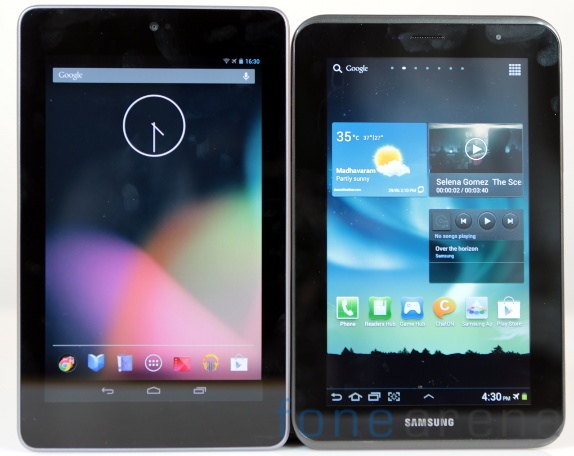
There's not an awful lot of difference between the Nexus 10 and Samsung Galaxy Tab 2 10.1 in terms of size and weight, to the naked eye it would be pretty hard to say which one is bigger/smaller for definite. We can tell you that the the Samsung Galaxy Tab 2 10.1 is in fact slightly smaller in terms of height and width than Google's tablet, but the Nexus 10 is significantly thinner. The Galaxy Tab 2 10.1 is also 22g lighter.
The Samsung Galaxy Tab 2 10.1 measures in at 256.7 x 175.3 x 9.7mm and weighs 581g. The Google Nexus 10 is 263.9 x 177.6 x 8.9mm and weighs 603g.
Nexus 10 vs Samsung Galaxy Tab 2 10.1: Screen

Both screens are jet over the 10-inch mark, but the real difference can be found by comparing the two's pixels per inch (ppi). The Nexus 10 has just over double the number of pixels, coming in at 300ppi next to the Samsung Galaxy Tab 2 10.1's comparatively puny 149ppi.
For the screen nerds out there, the Samsung Galaxy Tab 2 10.1 has a 10.1" WXGA (1280x800) PLS TFT screen, and the Google Nexus 10 has a 10.05" (2560x1600) WQXGA Corning Gorilla Glass 2 screen. To be fair to the Samsung Galaxy Tab 2 10.1, it looked pretty good during use too, but if it's pimple-showing clarity you're after then the Google Nexus 10 is the tablet for you here.
Nexus 10 vs Samsung Galaxy Tab 2 10.1: Processor and memory
The Samsung Galaxy Tab 2 10.1 has a a dual-core processor running at 1GHz, with 1GB RAM, yet the The Google Nexus 10 comes out on top here again, as it features a 1.7GHz Exynos 5250, a dual-core processor based on the ARM Cortex-A15 architecture, it also has 2GB of RAM.
When we put the two tablets through the GeekBench 2 test the results were as you'd expect with the Nexus 10's better processor enabling it to post the much better score of 2505 compared to the Galaxy Tab 2 10.1's 908. It is worth pointing out that the Nexus 10's GeekBench 2 score is the best we have seen from a tablet to date, even beating the iPad 4.
Nexus 10 vs Samsung Galaxy Tab 2 10.1: Storage
As mentioned above, both tablet are available to buy with 16GB or 32GB of storage. The only difference is that the Samsung Galaxy Tab 2 10.1 has a SD card which allows you to add an extra 32GB of expandable memory.
Nexus 10 vs Samsung Galaxy Tab 2 10.1: Camera
Using a tablet to take pictures is still a bit of a weird concept to us, nevertheless if your tablet has a camera you're going to want it to be a gooden. In the camera stakes it is yet another round for the more expensive Google Nexus 10, with it's 5Mp rear facing camera and 1.9Mp front facing camera, it also has a flash. The Galaxy Tab 2 10.1 however has no flash and an inferior 3Mp rear facing camera and a VGA front facing camera.
Nexus 10 vs Samsung Galaxy Tab 2 10.1: Connectivity
Both tablets come with 802.11 b/g/n Wi-Fi and Bluetooth connectivity as standard. The Samsung Galaxy Tab 2 10.1 can be bought with 3G connectivity too for a little more money, whereas the Nexus 10 doesn't offer this option. The Nexus 10 offers NFC (near field connectivity), while the The Samsung Galaxy Tab 2 10.1 doesn't.
Nexus 10 vs Samsung Galaxy Tab 2 10.1: Software

Nexus 10 vs Samsung Galaxy Tab 2 10.1: Battery
The Nexus 10 has the better battery here too, with it's 9000mAh battery giving it the ability to run for a few days of moderate use. That said the Samsung Galaxy Tab 2's 7000mAh battery is no chump either and will easily last well over a day of similar use.
Read more: www.pcadvisor.co.uk


